Sumwords - Know the Facts, Do the Math

A constraint-based math puzzle game combining trivia knowledge with equation solving
800
Trivia Questions
16
Categories
3
Difficulty Levels
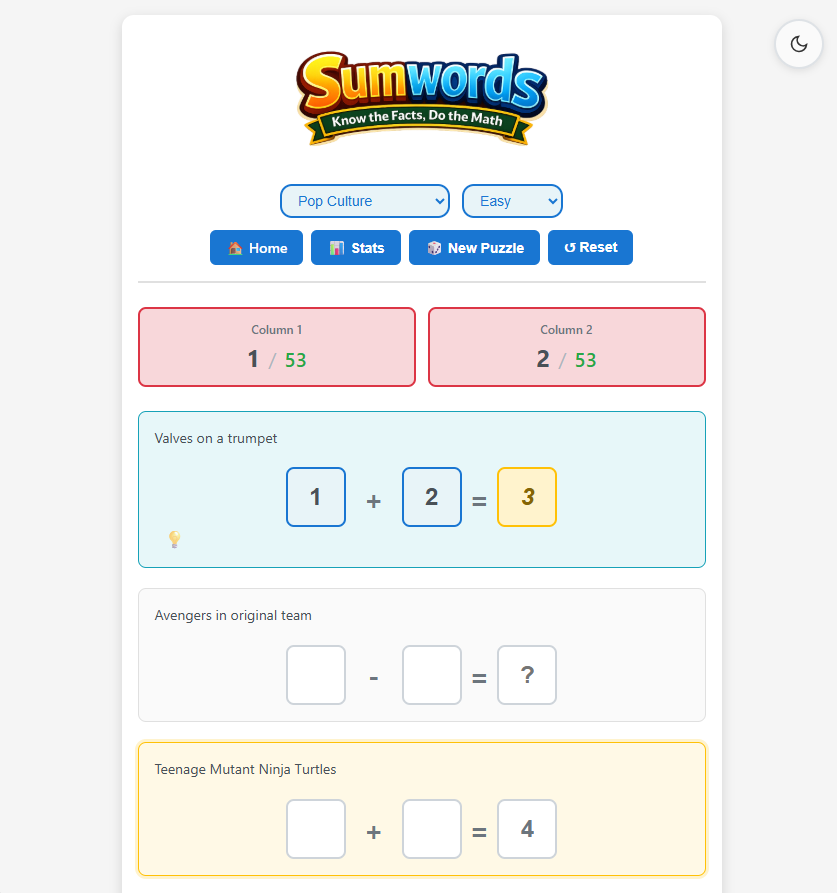
Sumwords in action
Sumwords in action

How to Play

1

Read the Trivia Question

Each equation has a trivia question. The answer is always a number that you need to place in the equation.

2

Place Numbers in Blanks

Click a number from the pool at the bottom, then click a blank space in an equation to place it.

3

Match Column Totals

Numbers in each column must add up to the target shown at the top. This is the key constraint!

4

Complete All Equations

Make sure each equation is mathematically correct, then submit to win and see the confetti!

๐Ÿ’ก Pro Tips

Start with the answer: Place the trivia answer in its equation first to anchor your strategy.
Use column targets: The column totals help you narrow down which numbers can go where.
Need help? Tap Hint on an equation to reveal its answer or its numbers. โœ“ Check shows its mark for one hint.
Earn stars: Every win earns 1 to 3 stars. Fewer attempts and hints earn more, and 3 stars is a perfect game. Check your stats to see completed puzzles, streaks, and stars.
Play with the keyboard: Select a blank and type a number to place it. Arrow keys move between blanks, Backspace clears one, Ctrl+Z undoes a move, Escape cancels, and Tab reaches the answer boxes.
Play offline: Install Sumwords from your browser's menu (Add to Home Screen on iPhone). After one online visit it plays offline, including the Daily puzzle.

Difficulty Levels

Every level has 5 equations with visible operators. Levels change the math, not the trivia, so any question can appear on any level.

Settings by difficulty
Setting Easy Medium Hard
Numbers up to 50 100 200
Operators + โˆ’ + โˆ’ + โˆ’ ร— รท
Number pool 10 12 16
Decoys 0 2 6

Every trivia answer is a whole number from 2 to 400. Bigger figures are asked in thousands or millions, and the question says so.

More about the levels
  • Each equation uses two pool numbers, so the pool holds 10 numbers on every level before decoys are added.
  • Decoys are extra pool numbers that belong to no equation. You have to work out which ones to leave out.
  • Random picks one of the three levels for you.

What the Marks Mean

Press Submit to check your work. Each equation card gets one mark, and each column target gets โœ“ or โœ—. The trivia answer is never shown.

How column marks work
  • Each column โœ“ or โœ— compares that column's total with its target at the top.
  • Submit marks equations and columns. It does not point to a single wrong number.

Features

๐ŸŽฏ

Three Difficulty Modes

Easy, Medium, and Hard modes with increasing complexity. Plus a Random mode that automatically selects a difficulty level for you. Levels change the math (operators, number range and decoys), not the trivia, so any question can appear on any level.

๐Ÿ“…

Daily Puzzle

One shared puzzle a day, always Everything and Medium. Everyone gets the same one, you can play it once per day, and you can share your result as Daily #2-12.

๐Ÿ’ก

Hint System

Tap Hint on any equation to reveal its trivia answer or its numbers. โœ“ Check shows whether that equation is right for one hint, and is free while it is incomplete or already marked.

๐Ÿ“Š

Statistics Tracking

Every win earns 1 to 3 stars. Three stars is one attempt with no hints: each extra attempt costs 2 points and each hint costs 1. The win panel shows your time, and stats track completed puzzles, streaks, and stars. Your current win streak is always on show as a ๐Ÿ”ฅ chip in the game header.

๐Ÿ“ฑ

Mobile Optimized

Fully responsive design works great on phones, tablets, and desktop.

๐Ÿ’พ

Auto-Save Progress

Game automatically saves your progress. Resume unfinished puzzles anytime.

๐ŸŽจ

Clean Interface

Modern, intuitive design with color-coded feedback and visual polish.

โ†ฉ๏ธ

Undo

Made a slip? Undo takes back your last placed or removed number. Use the Undo button or Ctrl+Z (Cmd+Z on Mac). The history is kept in memory only, so a page refresh clears it.

โฌ‡๏ธ

Install and Play Offline

Install Sumwords like an app and play offline after one online visit, Daily puzzle included.

How to install
  • Chrome, Edge or Android Chrome: use the install prompt, or open the browser menu and choose Install app.
  • iPhone or iPad: open the game in Safari, tap Share, then Add to Home Screen.
How to uninstall
  • Desktop Chrome or Edge: open the installed app, click the three-dot menu in its title bar, and choose Uninstall Sumwords.
  • Android Chrome: long-press the app icon and tap Uninstall.
  • iPhone or iPad: long-press the icon, then tap Remove App and Delete App.
  • Your saved puzzle and statistics stay in the browser unless you also clear the site data.

Question Categories

Choose from 16 specialized categories, or select Everything to mix questions from all categories for maximum variety.

Sports History Geography Pop Culture Science Movies & TV Food & Drink Technology Games & Literature Animals & Nature Music Space & Astronomy Body & Health Art & Architecture Transportation Holidays Everything

Ready to Play?

Test your trivia knowledge and math skills

Start Playing Now